---
title: How to edit interview settings
description: In this article, you will learn how to edit your interview settings within your Humaniz.io account
---
[Skip to content](https://support.humaniz.io/migration/how-to-edit-interview-settings#main-content)
English
Show submenu for translations
![65b91ee870714b234cc43b39\_Dark on Light Logo.svg\]](https://support.humaniz.io/hubfs/65b91ee870714b234cc43b39_Dark%20on%20Light%20Logo.svg)
- Home
- Products
- Pricing
- Blog
- Company
Open main navigation
Close main navigation
- Home
- Products
- Pricing
- Blog
- Company
- English
Show submenu for translations
- www.humaniz.io
www.humaniz.io
Grow and manage your real estate team with ease
- There are no suggestions because the search field is empty.
1. [Knowledge Base](https://support.humaniz.io/migration?hsLang=en)
2. [Recruiting](https://support.humaniz.io/migration/recruiting?hsLang=en)
# How to edit interview settings
## In this article, you will learn how to edit your interview settings within your Humaniz.io account
**How to Change Interview Settings**
Log in to your Humaniz.io account using your registered email address.
From your Dashboard, select Settings, and then under Company select Scheduling.
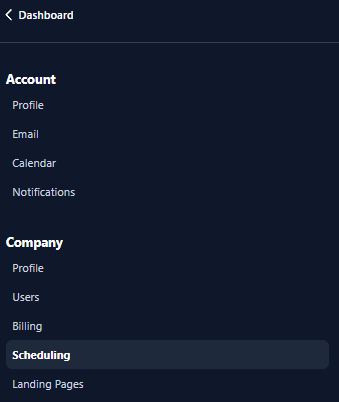
From Scheduling, you will click on the three dots directly to the right of “Interview Options.”

Here you will be able to edit your Interview event duration, interview event name and interview event description.
Once you have made desired changes, you can click on Preview to the far right of Interview Options to verify changes were made.
When you have verified your changes, select Save in the bottom right corner of the screen.
If you have any questions about changing your Interview Options, please contact Humaniz.io support.
- [Getting Started](https://support.humaniz.io/migration/getting-started?hsLang=en#main-content)
- [Account](https://support.humaniz.io/migration/getting-started?hsLang=en#account)
- [Company](https://support.humaniz.io/migration/getting-started?hsLang=en#company)
- [Candidate Management](https://support.humaniz.io/migration/getting-started?hsLang=en#candidate-management)
- [Team Management](https://support.humaniz.io/migration/getting-started?hsLang=en#team-management)
- [Templates](https://support.humaniz.io/migration/getting-started?hsLang=en#templates)
- [Recruiting](https://support.humaniz.io/migration/recruiting?hsLang=en)
- [Team Management](https://support.humaniz.io/migration/team-management?hsLang=en)
- Home
- Products
- Pricing
- Blog
- Company
# Humaniz, Inc.
Copyright Humaniz, Inc. 2024
Copyright © 2026, Humaniz, Inc.